
How can I Automate Conversations with Conversation flow?
Using Pre-built Industry-Specific Templates
Types of Available Conversation Flow Templates
Conversive provides a variety of pre-built, industry-specific templates designed to cater to the unique needs of different sectors. These templates streamline the creation of conversation flows, ensuring that businesses can effectively engage with customers right from the initial contact.
- Retail: Templates designed for product inquiries, order tracking, and promotional communication.
- Financial Services: Templates for loan applications, account inquiries, and financial advice.
- Healthcare: Appointment scheduling, medical inquiries, and patient follow-up conversations.
- Education: Student recruitment, course information, and application processes.
How to Select and Use a Template
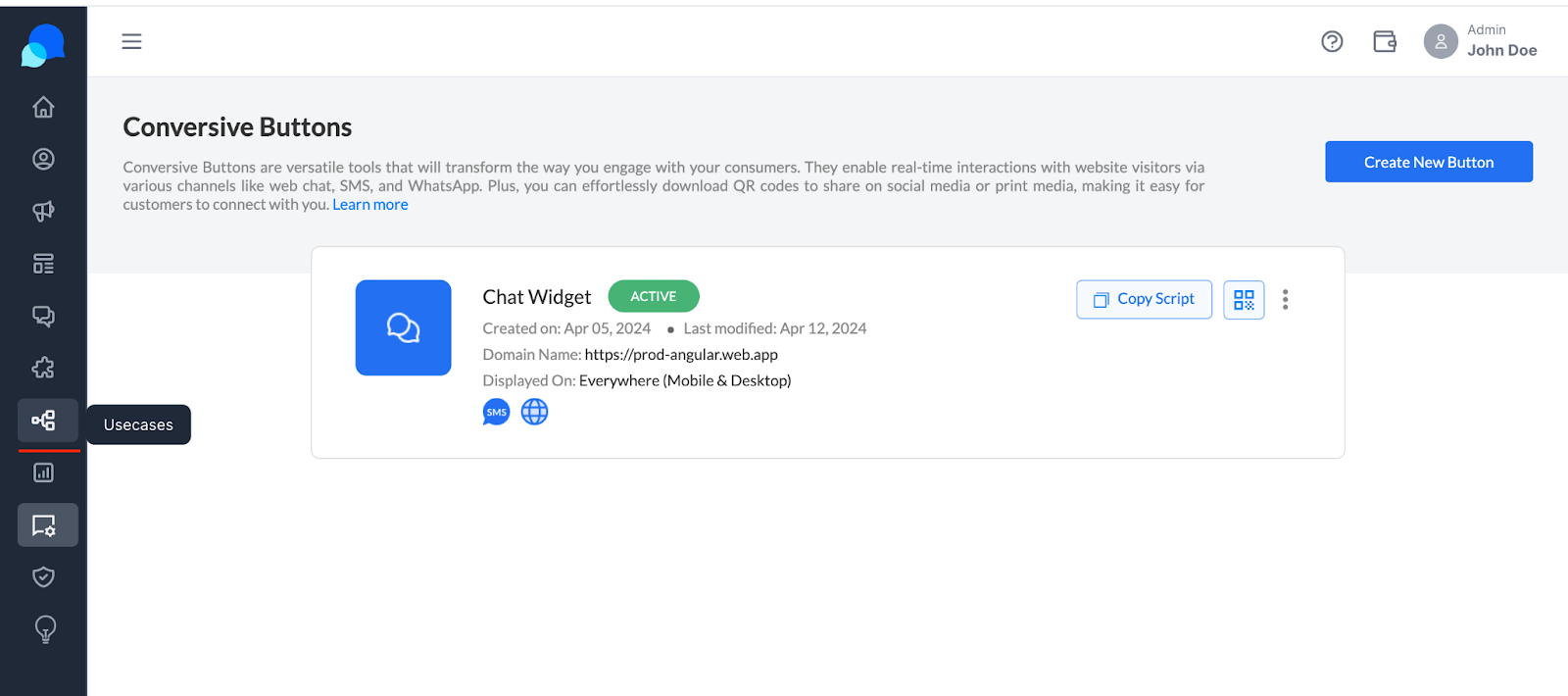
- Access the Template Library: Navigate to the ‘Usecases’ section in your Conversive dashboard.
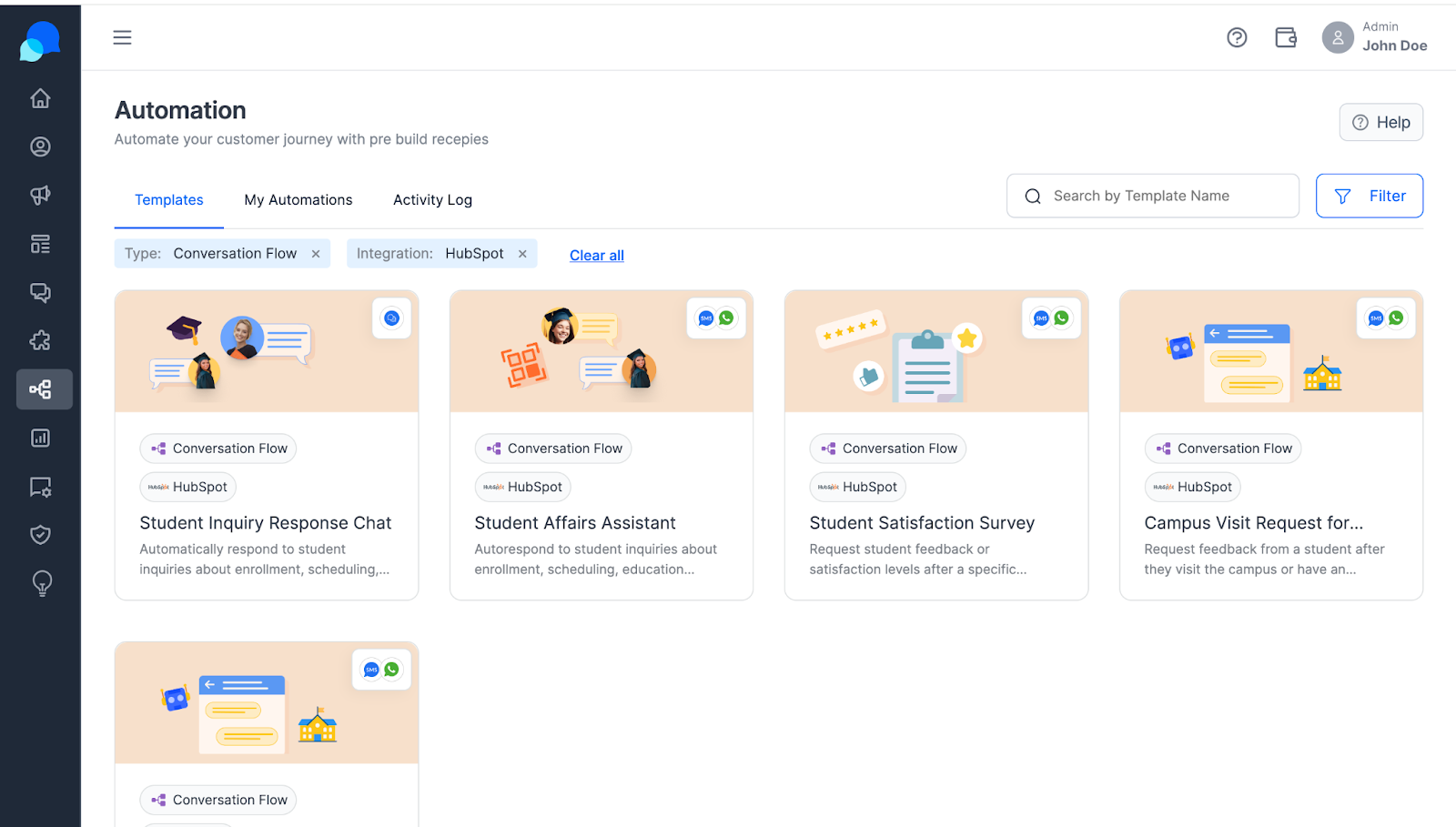
- Choose the Right Template: Filter templates by industry or use case type to find the most suitable option for your needs.
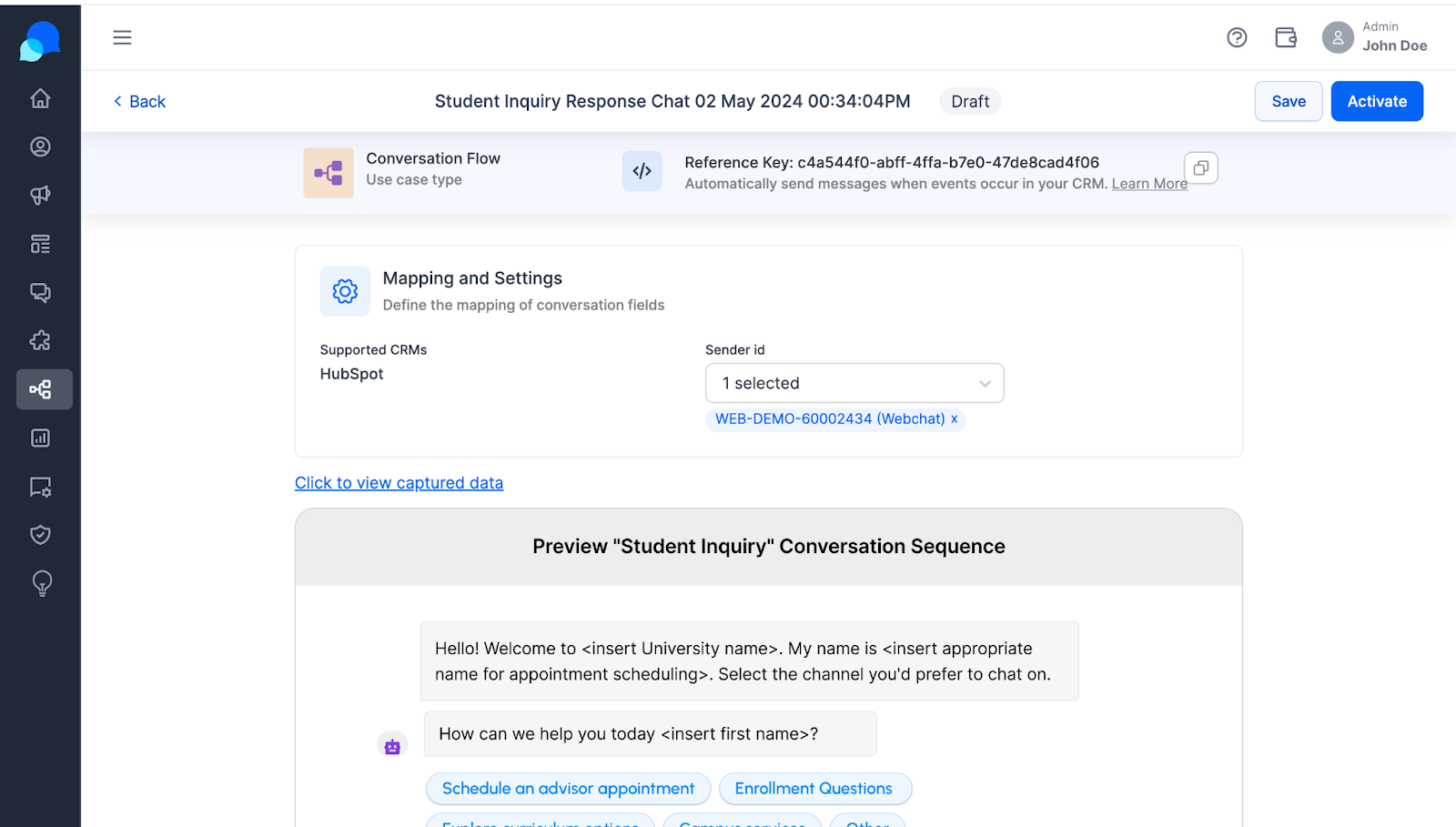
- Activate the Template to Quick Test: Activate the template by selecting the Sender ID that you are publishing with the conversive button, QR codes, or in other ads to make it respond using automated conversation flow.
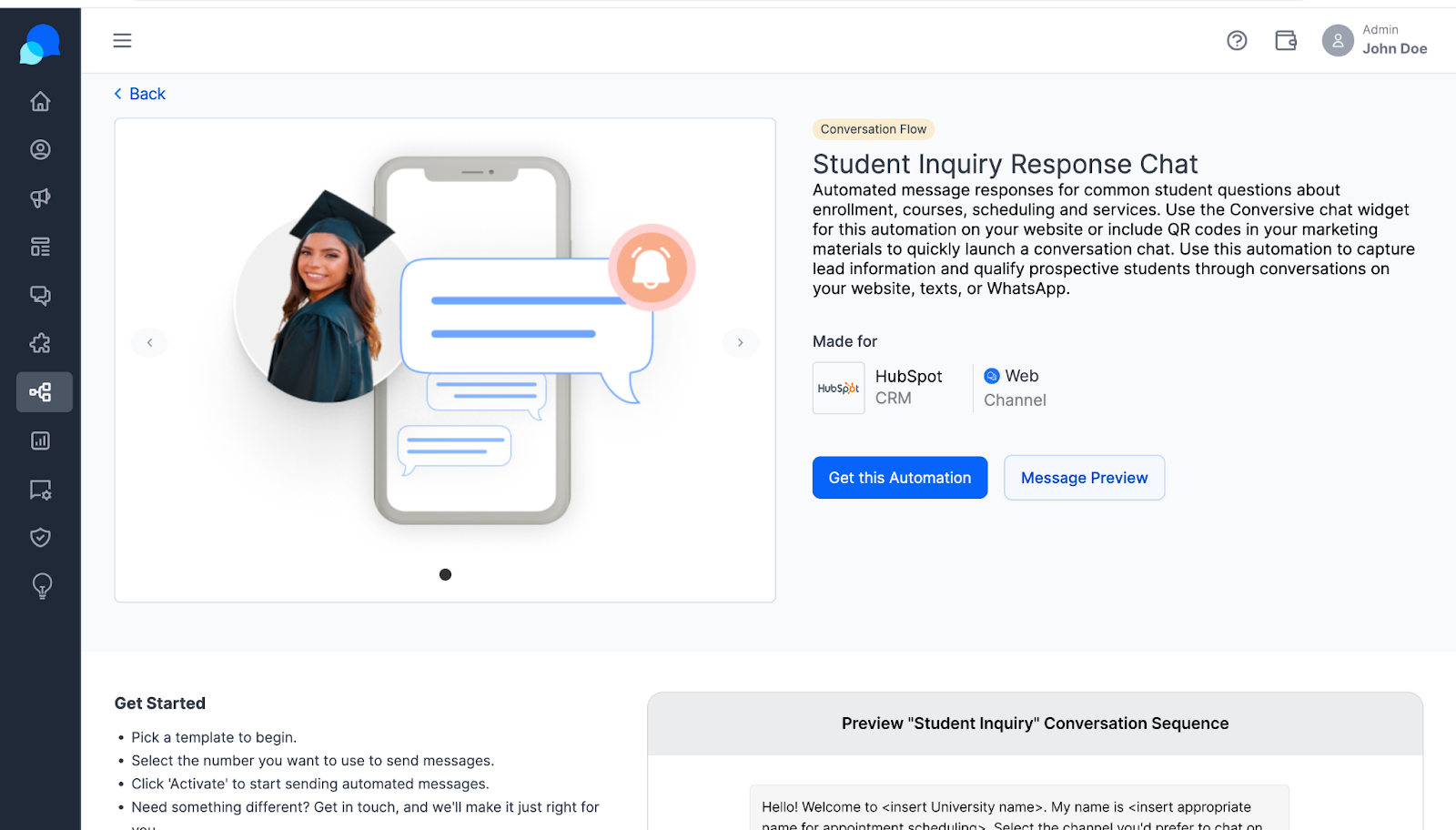
- Customize the Template: You can reach out to the Conversive team to customize it to better fit your specific requirements and branding.
How to Capture Basic consumer info & sync with CRM?
How Conversation Flows Capture Information
Conversation flows are structured to naturally collect essential consumer information as part of the interaction process. By integrating prompts and forms within these flows, businesses can gather data without disrupting the engagement.
How Automated Flows Assist in Lead Qualification
Automated conversation flows are equipped with algorithms to assess the quality of leads based on interaction data and predefined criteria, effectively scoring and qualifying leads for further engagement.
Automation of Data Capture for SMS and WhatsApp
- SMS and WhatsApp Integration: When a conversation is initiated via SMS or WhatsApp, the system automatically uses the activated flow to request and capture information like name, contact details, and specific needs or inquiries.
- Consent Verification: Ensure that all data capture via SMS and WhatsApp includes a step for users to consent to share their information, aligning with data protection standards.
CRM Integration and Lead Synchronization
Integrating your CRM with Conversive is a strategic move to streamline and enhance your lead management process. This integration not only automates the capture of leads via webforms but also ensures that these leads are synchronized directly into your CRM system, allowing for immediate and effective follow-up.
Sync Webform Leads to CRM
The process of synchronizing webform leads into your CRM is automated, significantly reducing manual data entry and ensuring that each lead is promptly captured and logged in your CRM system. Here’s how you can set up and manage this integration:
- Connecting Your CRM: Initially, when you connect your CRM with Conversive, the integration is automatically activated. This setup includes the default mapping of relevant data fields, ensuring that information collected through Conversive, such as names, email addresses, and phone numbers, is directly mirrored in your CRM.
- Configuring Lead Sync:
- Navigate to the Integration settings in your Conversive dashboard.
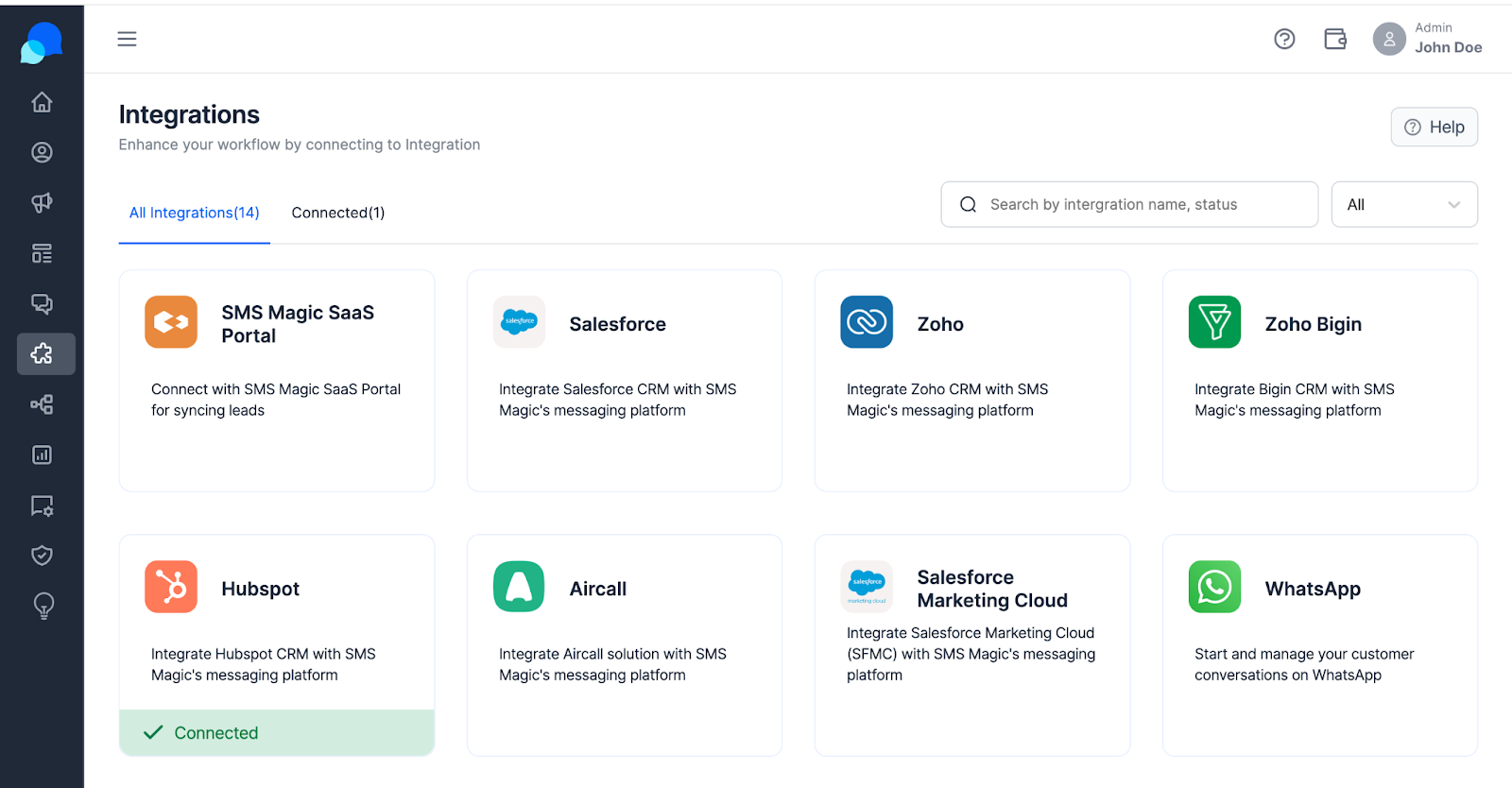
- Select your CRM, such as HubSpot, from the list of available integrations.
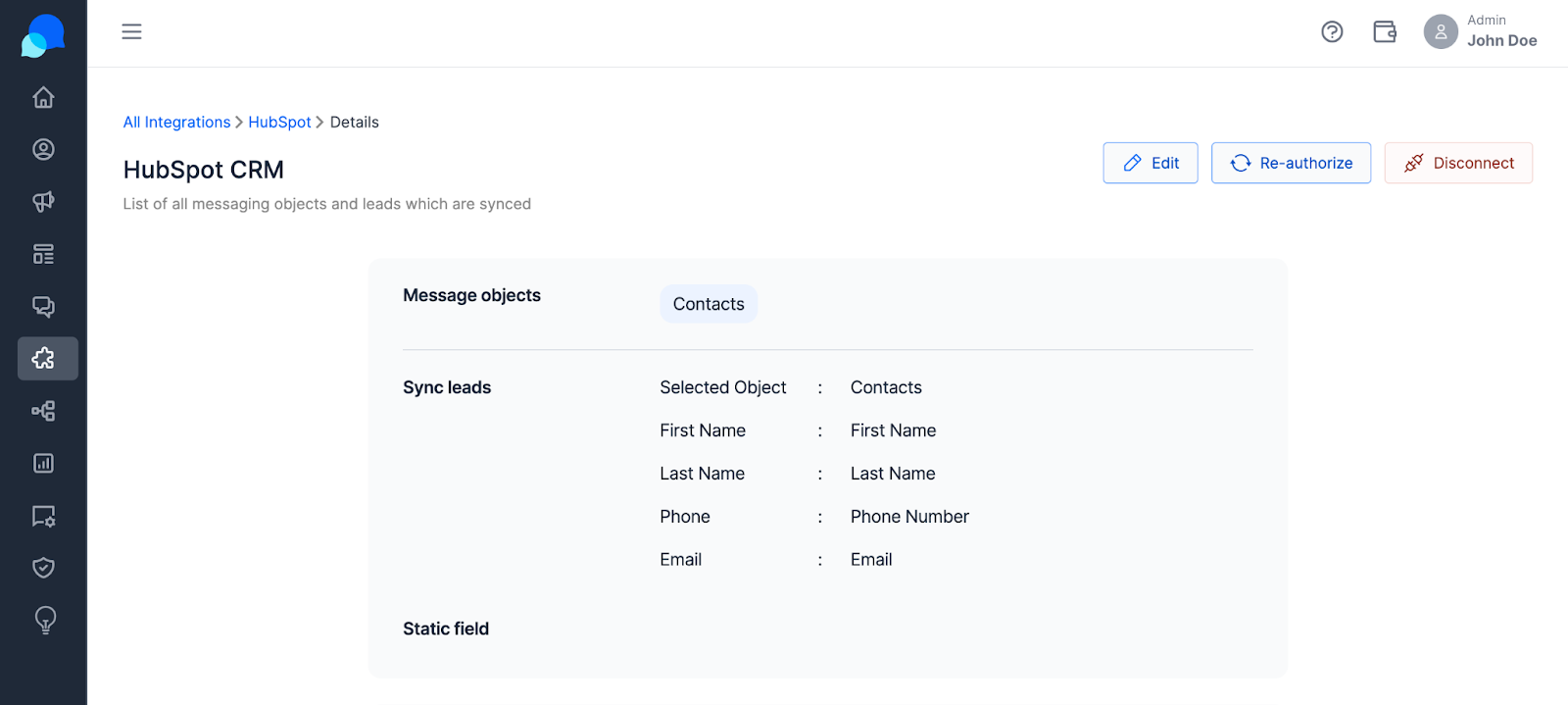
- Enable the sync lead option to start the synchronization process. This setting ensures that every piece of information entered into a webform is automatically pushed as a new lead into your CRM.
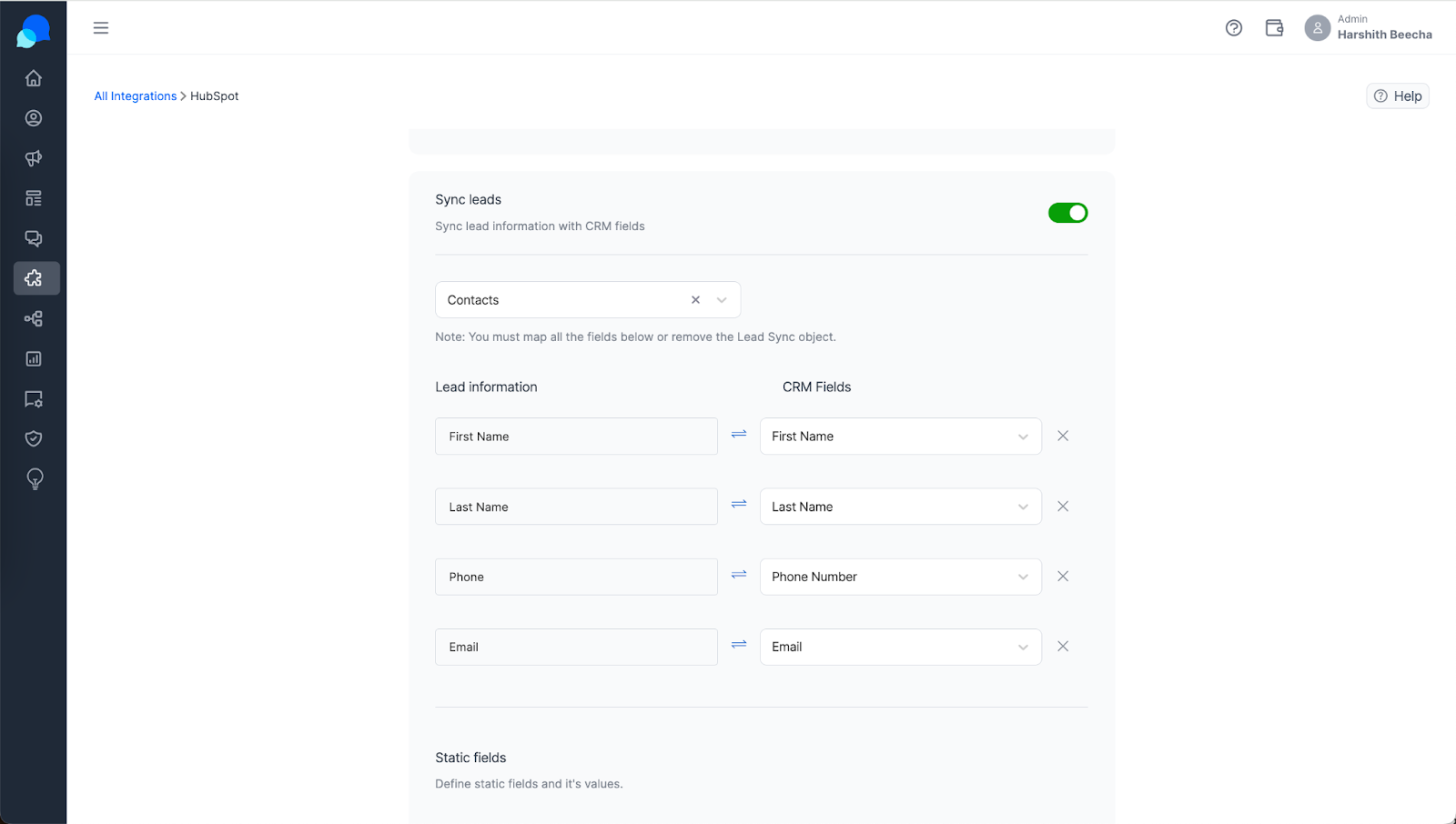
- Managing Data Synchronization:
- Access the integration settings to view or modify the default data mappings. Adjust these mappings to better fit your CRM’s existing lead management structure.
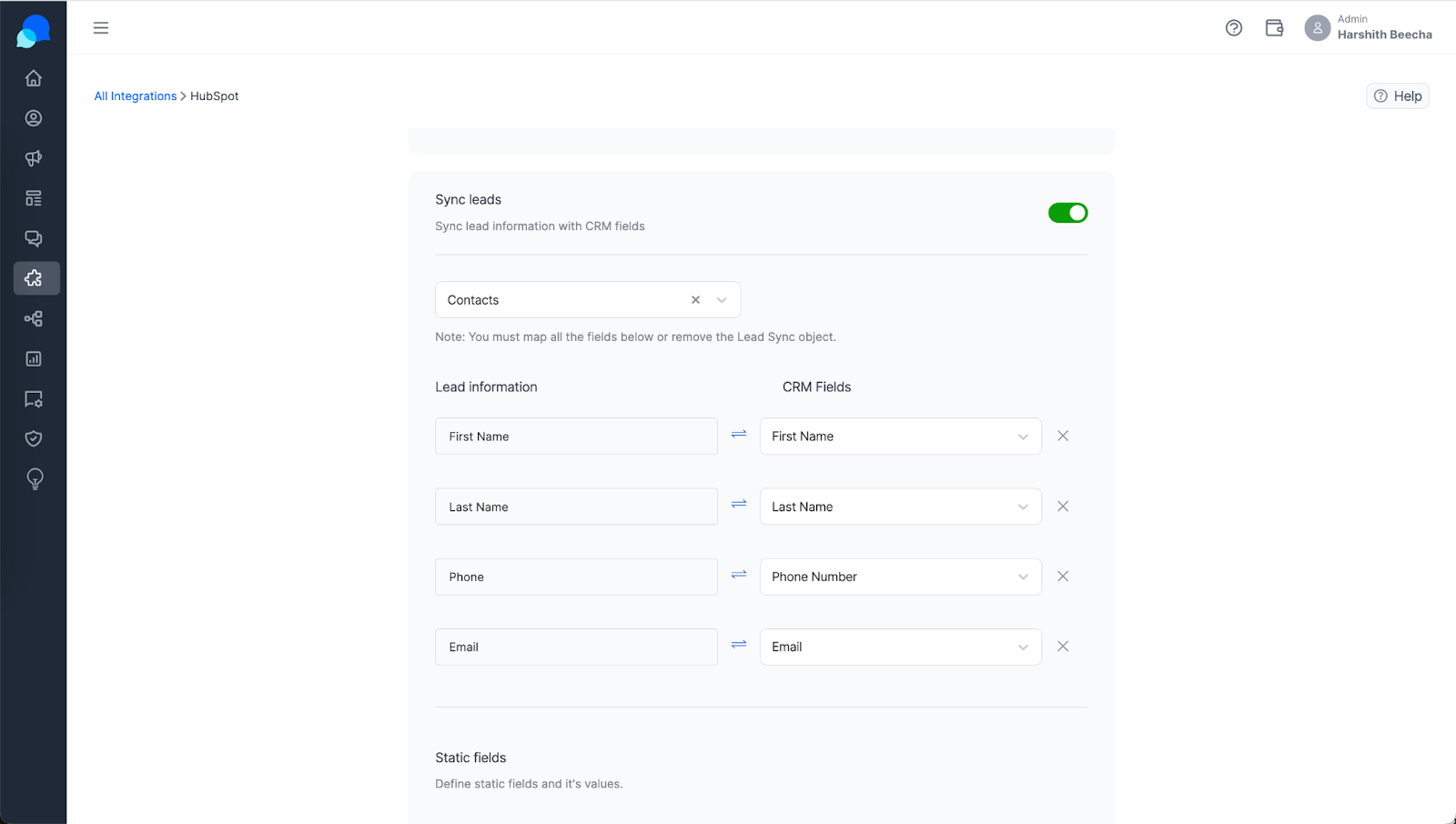
- You have the flexibility to enable or disable the syncing of specific data fields based on your business requirements and data handling policies.
Benefits of CRM Synchronization
- Real-Time Lead Updates: As soon as a visitor submits information through a webform, their details are captured and immediately updated in your CRM, ensuring no leads are lost.
- Efficient Lead Management: Automating the data capture and synchronization process allows your sales team to quickly access new leads and reduces the chances of data errors that can occur with manual entry.
- Enhanced Customer Engagement: With immediate access to lead information, your sales and marketing teams can engage potential customers with relevant and timely communications, improving the chances of conversion.
How to Manage Conversations & Responses?
Live Chat Functionality as Default Behavior
Default Live Chat Interaction:
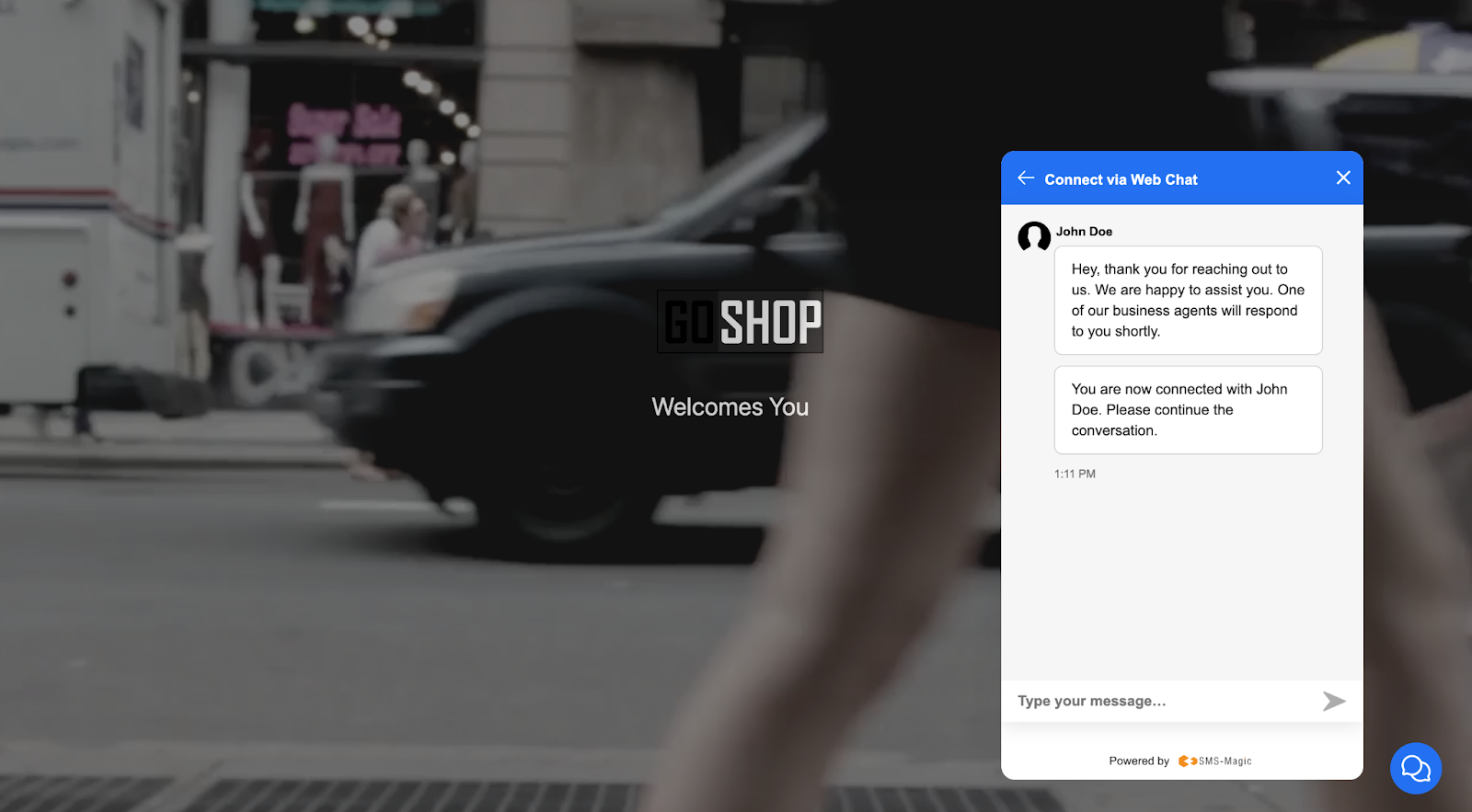
In the absence of an activated conversational flow, the Conversive button functions by default as a live chat interface. This default setup ensures that any inbound messages are instantly routed to the available human agent in their individual inbox, facilitating immediate and direct communication.
- Immediate Human Interaction: This default behavior ensures that customers seeking assistance are directly connected with a human agent without any automated intermediaries, fostering a direct and personal communication line.
- Operational Flexibility: It provides the operational flexibility to toggle between automated assistance and live human interaction based on current service strategies and capabilities, adapting dynamically to various customer service scenarios.
Responding to the Conversation by Bot
Overview of Bot Conversations:
Bot-driven conversations are central to efficiently managing high-volume customer inquiries within Conversive. When a conversation flow is specifically activated, and the customer initiates communication via SMS, WhatsApp, or web chat, these interactions are directed to a specialized “bot conversations” inbox. This organizational method ensures that automated interactions are handled separately, allowing customer service agents to concentrate on more complex queries requiring human intervention.
How Bot Conversations Work:
- Automatic Handling: Conversations appropriate for automated handling are categorized into the “bot conversations” inbox, optimizing the management of these interactions.
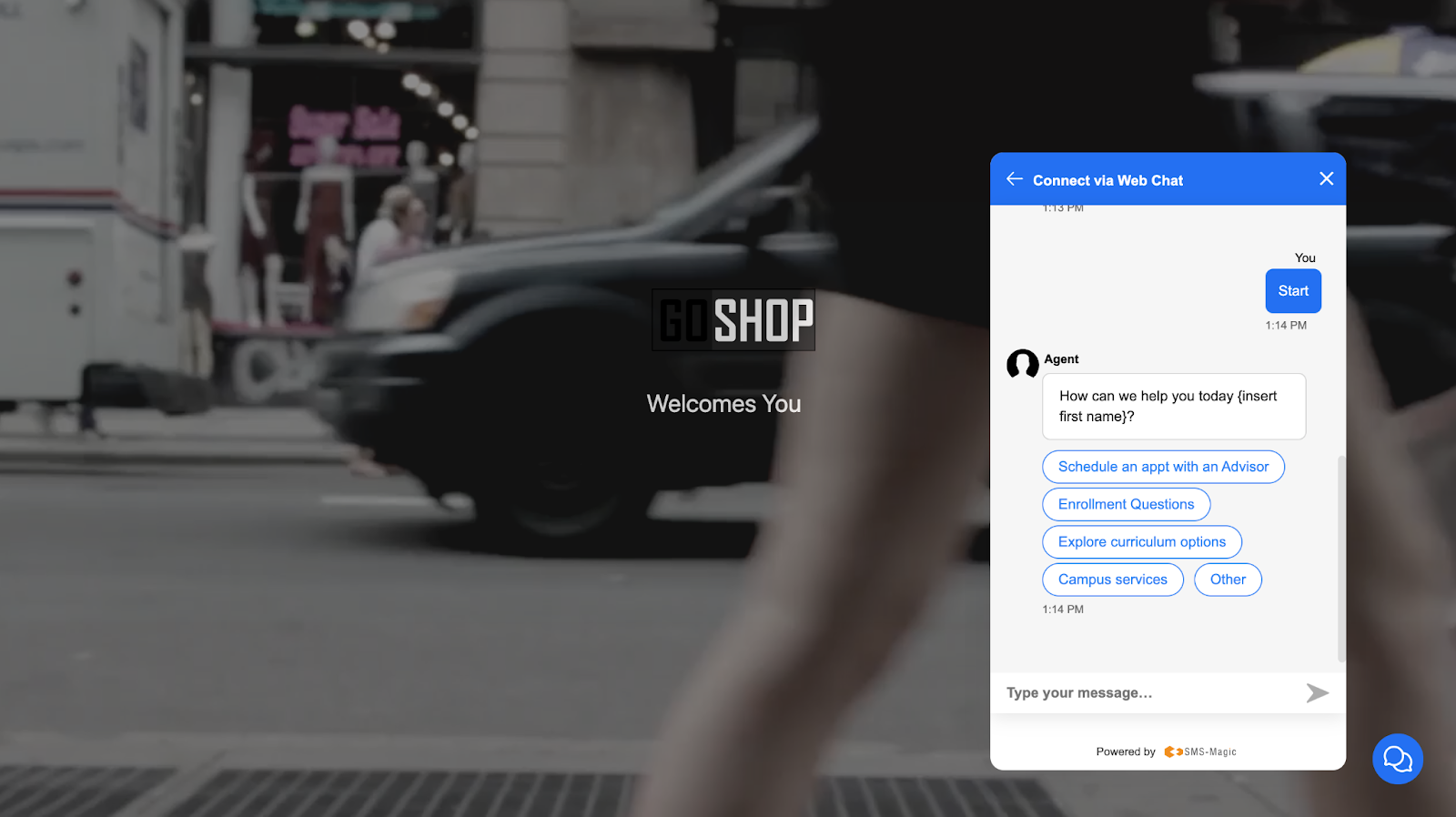
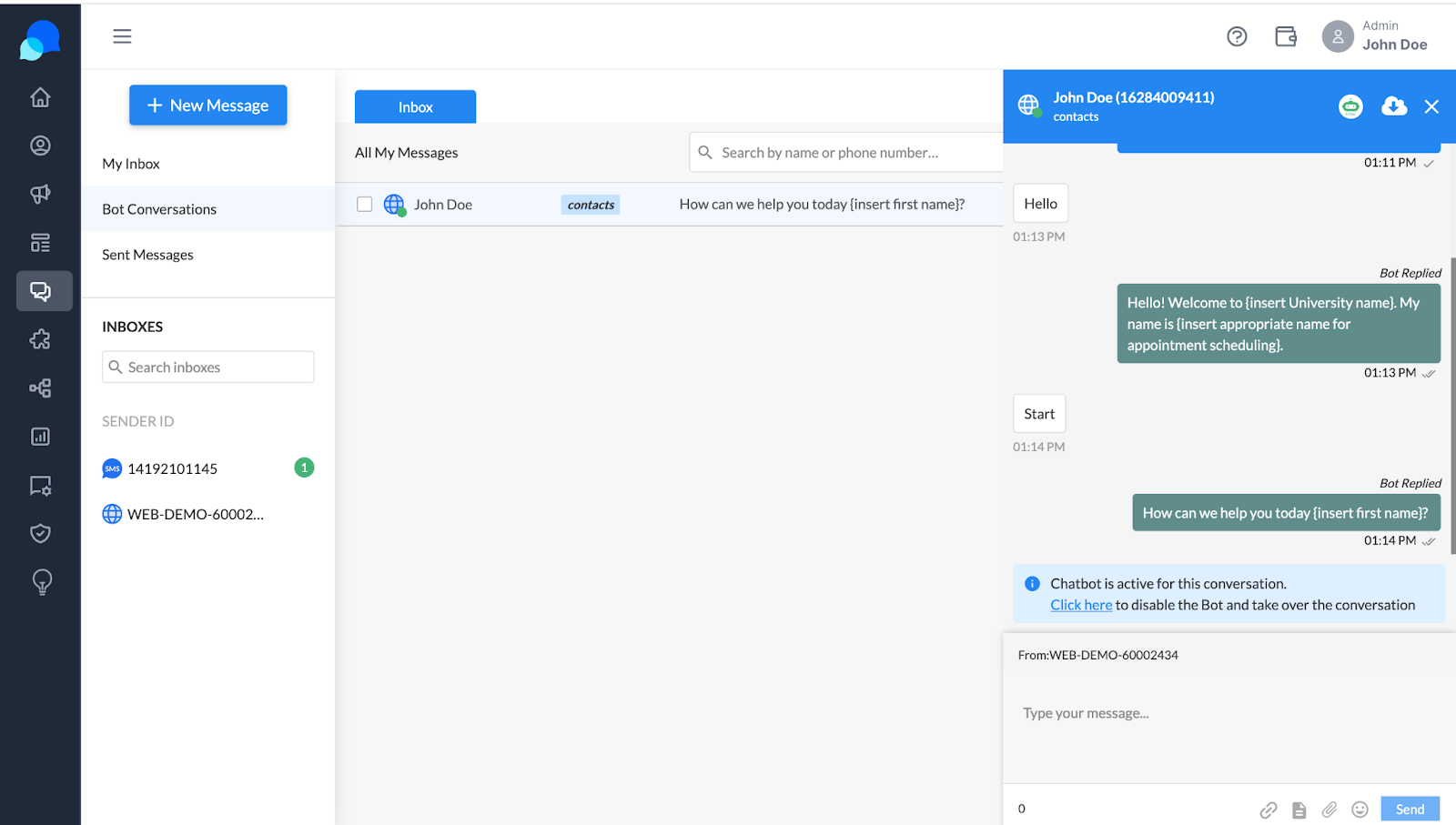
- Continuation of Automated Service: Automated conversations proceed seamlessly unless there is a need for human attention, triggered by a complex query or a customer’s request.
Bot Conversations and Agent Handoff
Managing Transitions to Human Agents:
While automation efficiently handles routine inquiries, situations requiring a human touch—due to query complexity or customer preference—necessitate seamless integration of human agents.
- Triggering Agent Handoff:
- Conversations are transferred from the automated “bot conversations” inbox to an agent’s personal inbox when human intervention is needed, either by system designation or by explicit customer request.
- This transfer signals the need for human engagement, ensuring a smooth transition from automated to personal interaction.
- Agent Notification and Engagement:
- Agents are promptly notified when conversations require their input, ensuring they are prepared with relevant context.
- Agents access the entire conversation history, allowing for informed and personalized responses to maintain service continuity.
- Direct Agent Interaction:
- Post-handoff, agents handle these conversations directly through the Conversive desk, engaging in one-on-one messaging to resolve the customer’s inquiry effectively.
This comprehensive approach to managing conversations ensures that every customer interaction, whether automated or live, is handled with maximum efficiency. Conversive’s system not only leverages advanced automation for routine inquiries but also ensures that more complex or sensitive issues receive the nuanced attention only a human agent can provide. The adaptability of switching between bot-driven and live interactions enhances the responsiveness and effectiveness of customer service operations, ensuring high levels of customer satisfaction and engagement.